Hello Friends !!
Here we are with our much-awaited blog of the series Create To-do list app using Ethereum Blockchain.
In Part-1, Part-2 we have set up a project, created a smart contract, and deployed on ethereum blockchain using metamask and performed the test.
In this part, we will create tasks for the client-side application to interact with the todo list smart contract. You’ll need to create the following files for your project:
Create Task
We’ve already created a function for creating tasks, but it is not complete. That’s because I want to trigger an event any time that a new task is created. So add below TaskCreated event and call from creat task function.
pragma solidity >0.5.2;
contract TodoList {
  uint public taskCount = 0;
  struct Task {
    uint id;
    string content;
    bool completed;
  }
  mapping(uint => Task) public tasks;
  event TaskCreated(
    uint id,
    string content,
    bool completed
  );
 constructor() public {
        createTask("initialise create task todo list");
  }
  function createTask(string memory _content) public {
    taskCount ++;
    tasks[taskCount] = Task(taskCount, _content, false);
    emit TaskCreated(taskCount, _content, false);
  }
}
Let’s create a test to ensure that this event is triggered any time a new task is created. We will inspect the transaction receipt when the new task is created. This will contain all of the log information that will contain the event data.
it('creates tasks', async () => {
   const result = await this.todoList.createTask('A new task')
   const taskCount = await this.todoList.taskCount()
   assert.equal(taskCount, 2)
   const event = result.logs[0].args
   assert.equal(event.id.toNumber(), 2)
   assert.equal(event.content, 'A new task')
   assert.equal(event.completed, false)
 })
Run Test
$ truffle test
Now let’s deploy a new copy of the smart contract to the blockchain since the code has changed.
$ truffle migrate –reset
For enabling input box for creating task, un-comment the form code in the index.html file.
<form onSubmit="App.createTask(); return false;">
  <input id="newTask" type="text" class="form-control" placeholder="Add task..." required>
  <input type="submit" hidden="">
</form>
Now we’ll add a createTask() function in the app.js file like this.
createTask: async () => {
  App.setLoading(true)
  const content = $('#newTask').val()
  await App.todoList.createTask(content)
  window.location.reload()
},
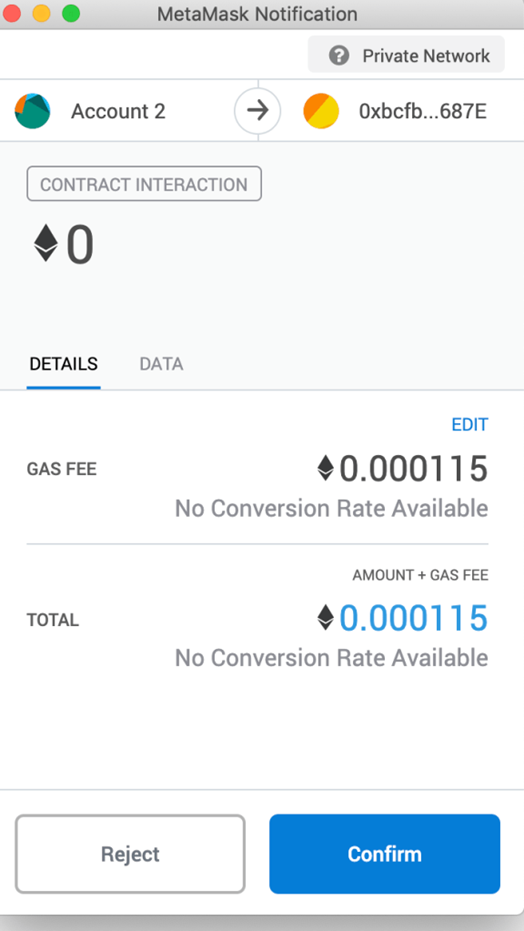
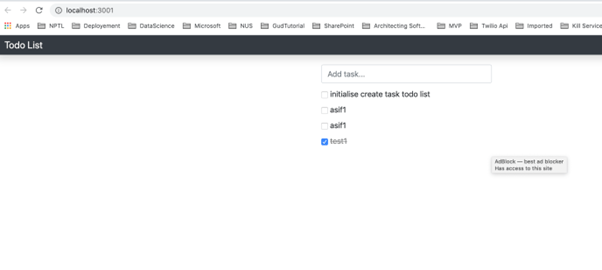
Now enter some task name in the input box and enter .task will be added. To perform transaction it will ask confirmation of metamask.
Implement Complete Tasks
They will appear in the “completed” list, struck through.We’ll add a TaskComplted() event, and trigger it inside a new toggleCompleted() function like this.
pragma solidity >0.5.2;

contract TodoList {
  uint public taskCount = 0;

  struct Task {
    uint id;
    string content;
    bool completed;
  }
  mapping(uint => Task) public tasks;
  event TaskCreated(
    uint id,
    string content,
    bool completed
  );
  event TaskCompleted(
    uint id,
    bool completed
  );
 constructor() public {
        createTask("initialise create task todo list");
  }
  function createTask(string memory _content) public {
    taskCount ++;
    tasks[taskCount] = Task(taskCount, _content, false);
    emit TaskCreated(taskCount, _content, false);
  }
  function toggleCompleted(uint _id) public {
    Task memory _task = tasks[_id];
    _task.completed = !_task.completed;
    tasks[_id] = _task;
    emit TaskCompleted(_id, _task.completed);
  }
}
Now we’ll add a test like this.
it('toggles task completion', async () => {
  const result = await this.todoList.toggleCompleted(1)
  const task = await this.todoList.tasks(1)
  assert.equal(task.completed, true)
  const event = result.logs[0].args
  assert.equal(event.id.toNumber(), 1)
  assert.equal(event.completed, true)
})
run the test:
$ truffle test
let’s deploy a new copy of the smart contract to the blockchain since the code has changed:
$ truffle migrate --reset
Now let’s update the the client side code. First we’ll add the event listener inside the renderTasks() function.
$newTaskTemplate.find('input')
  .prop('name', taskId)
  .prop('checked', taskCompleted)
  .on('click', App.toggleCompleted)
Now we’ll add a toggleCompleted() function in the app.js file like this.
toggleCompleted: async (e) => {
  App.setLoading(true)
  const taskId = e.target.name
  await App.todoList.toggleCompleted(taskId)
  window.location.reload()
},
Now, find a task in the client-side application and click the checkbox. Once you sign this transaction, it will check off the task from the todo list! Please refer to the code Github.
Hope you all will like this final part of this blog series. Please share and subscribe Flexmind site for more wonderful articles.