Hello everyone !!
In today’s blog you will learn about PowerShell scripting on How to generate Microsoft Teams basic Report for Office 365. In my last blog I discussed about adding bulk users from CSV file to Microsoft Teams using PowerShell and also how we can connect to teams. So I will skip connecting to the teams part and directly jump to main subject.
As you know most of the times as an administrator we need to generate reports related to Teams in our environment or tenant. Manager can ask you about number of users and their roles in a team. I developed a PowerShell script to extract basic information associated with users in a team in a csv file.
Script is given below to extract MS Teams Report for Office 365.
##This script will be used to generate CSV report file related to MS Teams of an organisation.
##Pre-requisite: Connect to Microsoft Teams Powershell & Exchange Online Powershell for this to work.
##Link for MS Team: https://docs.microsoft.com/en-us/powershell/teams/?view=teams-ps
##Link for Exchange online: https://docs.microsoft.com/en-us/powershell/exchange/exchange-online/connect-to-exchange-online-powershell/connect-to-exchange-online-powershell?view=exchange-ps
##Version: 1.0
##Date: 15-04-2020
##Author: Rakesh Pandey

$team = Get-Team
$csvreport = foreach($grpid in $team.GroupId)
{
$TeamName = Get-Team -GroupId $grpid
$TeamCreationDate = Get-UnifiedGroup -identity $grpid | Select -expandproperty WhenCreatedUTC
Get-TeamUser -GroupId $grpid |Select-Object @{Name='Team';Expression ={$TeamName.DisplayName}},User,Name,Role,@{Name='Team Creation Date';Expression ={$TeamCreationDate}}
}
$csvreport | Export-Csv -Path '<Location to CSV File>\TeamReport.Csv'
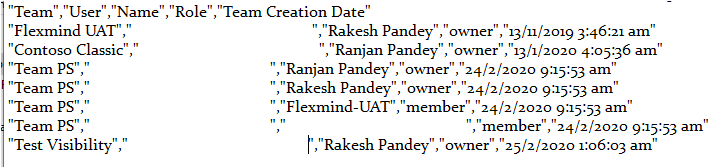
Sample report will look like below.
For more details on PowerShell commands related to MS teams, click on this link.
I hope you enjoyed this post on How to generate Microsoft Teams basic Report for Office 365. If yes, please share this article and subscribe to our web site for more stuff on Microsoft Teams. Also very soon we will release a tutorial for Microsoft Teams end users, stay tuned with us.
Thank you!